AimOffset Player
Play an AimOffset
UAnimGraphNode_RotationOffsetBlendSpace
FAnimNode_RotationOffsetBlendSpace
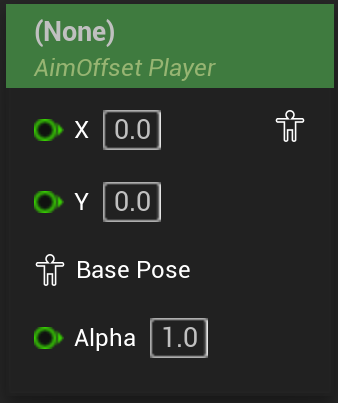
Plays a given AimOffset BlendSpace with the provided coordinates.
Settings include all relevant data like play rate, start position and whether the animation should loop.
In the node creation menu this node shows up in its pure form without an associated AimOffset, but also for every AimOffset for the skeleton of the AnimBP in the format of “AimOffset Player <AimOffset>” where, if chosen, the node will have the corresponding AimOffset already assigned.
This node works for both regular AimOffset assets (2D AimOffset) or 1D AimOffset assets.
On switching the AimOffset type
When dragging a BlendSpace asset into the graph, UE wil automatically expose the correct number of coordinate inputs for the given BlendSpace. When assigning a different type of AimOffset to an already existing node in an AnimBP, UE will not correctly refresh the coordinate inputs on its own though. To have access to them in the graph you need to refresh the nodes(for example by right-clicking on the node and choosing “refresh node”)
The node can be converted to a LookAt AimOffset with the same AimOffset, or an AimOffset Graph via the right click menu.
On converting between players
The conversion between AimOffset player, evaluator, and graph only works when a AimOffset is specified.
Empty nodes still have the option available in the right click menu, but will not actually perform the conversion.